google chrome virus attack

Posted by blogger newbie on 16.21

From detiknet again ya, if the virus is already reportedly designed to fool the Google Chrome users start to flourish. This was said by Bit Defender security company, that a malicious program disguised as an extension comes with Google Chrome.

Attack mode that begins with an email that advertises the existence of a new kstension Google Chrome. False Extension is claimed capable of 'helping organizations received the documents via email'. Well, the mail contains a link to this page Google Chrome extensions are fake. This page will menaut to file with the suffix. Exe and not. Crx which is the original suffix for extension of Google Chrome.

Malicious programs that will change the Hosts file from Windows and block access to Yahoo and Google. If the victim tried to access both the popular site, the page that appears is a fake page.

Well, it is dangerous too ya.

So for those of you who still use Google Chrome suka2 hati2 his aja, if can not install too many extensions, install an important kira2 aja. And hati2 with emails like that already dijelasi above.

Attack mode that begins with an email that advertises the existence of a new kstension Google Chrome

Posted by blogger newbie on 16.21

From detiknet again ya, if the virus is already reportedly designed to fool the Google Chrome users start to flourish. This was said by Bit Defender security company, that a malicious program disguised as an extension comes with Google Chrome.

Attack mode that begins with an email that advertises the existence of a new kstension Google Chrome. False Extension is claimed capable of 'helping organizations received the documents via email'. Well, the mail contains a link to this page Google Chrome extensions are fake. This page will menaut to file with the suffix. Exe and not. Crx which is the original suffix for extension of Google Chrome.

Malicious programs that will change the Hosts file from Windows and block access to Yahoo and Google. If the victim tried to access both the popular site, the page that appears is a fake page.

Well, it is dangerous too ya.

So for those of you who still use Google Chrome suka2 hati2 his aja, if can not install too many extensions, install an important kira2 aja. And hati2 with emails like that already dijelasi above.

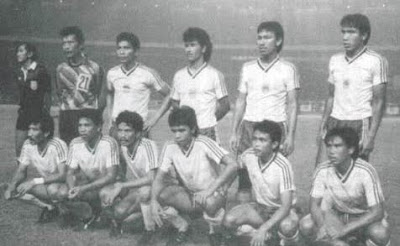
Persib Hystory

Posted by blogger newbie on 16.15

Prior named Persib, in Bandung stood Bandoeng Inlandsche Voetbal Bond (BIVB) in the years around 1923. BIVB This is one of the nationalist struggle of the organization at that time. Noted as the General Chairman is Mr. BIVB. Syamsudin which was then forwarded by the son of a woman warrior Goddess of variables, namely R. Atot.

Atot this reason, registered as a Commissioner of the West Java area of the first. BIVB field advantage in front of the tribune Tegallega racetrack. This BIVB teams entered the game a few times outside of cities like Yogyakarta and Jakarta Jatinegara.

On April 19, 1930, together with VIJ Jakarta BIVB, SIVB (Persebaya), MIVB (now PPSM Magelang), MVB (PSM Madison), VVB (Persis Solo), PSM (PSIM Yogyakarta) PSSI birth to participate in a meeting held in Societeit Hadiprojo Yogyakarta. BIVB in the meeting was represented by Mr. Shamsuddin. A year later the annual competition between cities / unions organized. BIVB successful unions in the final competition in 1933 despite losing to VIJ Jakarta.

BIVB then disappeared and came two other clubs are also colored by the Football Association of Indonesian nationalism Indonesia Bandung (PSIB) and the National Voetball Bond (NVB). On March 14, 1933, the two clubs had agreed to perform fusion and Joiner was born named Persib who then chooses Anwar St. Pamoentjak as chairman. The clubs are joined into Persib is READY, Soenda, Singgalang, Diana, the Sun, Ovu, RAN, HBOM, JOP, MALTA, and Merapi.

Persib back in the final league competition in 1934, and again lost to VIJ Jakarta. Two years later Persib back in the final and suffered the defeat of Persis Solo. New in 1937, Persib managed to win the competition after the final reply to the defeat of the Right.

In Bandung at that time also had standing football clubs sponsored by the Dutch people Bandung & Omstreken Voetbal Bond (VBBO). These associations are often looked down on Persib. As if Persib an association of "second class". VBBO often mocked Persib. It's known games, held by Persib conducted on the outskirts of Bandung-when it-like Tegallega and Ciroyom. The community when it was more like watching the game that was held VBBO. Location of the match was in the city of Bandung and certainly considered more prestigious, ie, two fields in the city center, UNI and SIDOLIG.

Persib won the "cold war" and became the only football club for the people of Bandung and its surroundings. The clubs that had shelter under VBBO like UNI and SIDOLIG joined Persib. Even VBBO (had turned into PSBS as a strategy) and then also submit regular field which they use to compete UNI Field, Field SIDOLIG (now Stadium Persib), and Field Sparta (now Stadium Siliwangi). This situation is of course confirmed the existence Persib in Bandung.

When Indonesia fell to the Japanese. Shaded football activities in the organization and its organization banned discontinued. This not only happens in Bandung, but also throughout the country. With the vacuum itself Persib experience. Moreover, the Japanese colonial government also established a new association which is responsible for sports activities when it ie Rengo Kai Tai Iku.

But as organizations struggle bernapaskan, Persib not simply surrender to the will of the Japanese. It officially changed its name Persib with a Japanese-speaking earlier. But the fighting spirit, purpose and mission Persib as a means of struggle has not changed one bit.

During Physical Revolution, after Indonesia's independence, Persib again showed its existence. The situation and conditions then forced Persib to not only exist in Bandung. But scattered in different cities, so there Persib in Tasikmalaya, Persib in Sumedang, and Persib in Yogyakarta. In those days warriors struggle Siliwangi migrated to the capital of Yogyakarta.

New year 1948 Persib again standing in Bandung, a city-born who then raised him. Undermining the Dutch came back, VBBO strived to live again by the Netherlands (NICA), although with a name Persib speak Indonesian as part of the national struggle for power, of course with all his strength trying to thwart these efforts. During the occupation of NICA, Persib re-established the business, among others, doctors Moses, Munadi, H. Alexa, Rd. Sugeng with Chairman Munadi.

Persib struggle apparently succeeded, so in Bandung, there's only one football club which is based on the spirit of nationalism Persib. For the purposes of organizational management, the 1950s decade was also noted important events. In the period 1953-1957 was Persib moved around the end of its secretariat. Mayor of Bandung when it R. Enoch, the Secretariat building in Cilentah Persib. Before the end of efforts R. Soendoro, Persib managed to have a secretariat Persib which until now in the Road Gurame.

At that time, a reputation as one of the warlords Persib union competition began to be built. During the competition line-up, carrying Persib never be a champion as much as four times that in 1961, 1986, 1990, and at the last competition in 1994. In addition Persib succeeded in becoming the second team in 1950, 1959, 1966, 1983, and 1985.

Might Persib team that commandeered Robby Dervish in the last league competition continues with the success of their first embrace Indonesian League champions in 1995. Persib who was not able to penetrate reinforced the dominance of foreign players a team of ex Galatama team that dominated the preliminary round and placed seven teams in the round of eight. Persib finally appears to be the champion after defeating Petrochemicals Son through the goals that were created by Sutiono Lamso at minute 76.

Unfortunately after the champion, Persib achievement tends to decline. The climax occurred when they were almost relegated to Division I in 2003. Fortunate, through the drama of the playoffs, blue-and-blue costumed teams successfully survive in the Division Main.

Known as a tough team, Persib also known as a club that often a contributor to the national team players both junior and senior. A series of names such as Risnandar Soendoro, Nandar Iskandar, Adeng Hudaya, Heri Kiswanto, Adjat Sudradjat, Joseph Bachtiar, Dadang Kurnia, Robby Darwis, Budiman, Nuralim, Yaris Riyadi until Erik Setiawan generation is partly the result of the built Persib national team players.

the causes of the computer can be damaged

Posted by blogger newbie on 16.01

Ngenet was fun, eh even hangs my computer, I restarted, just want to go to bios .. already hangs again ... wah would be very upset ... when before is okay .. but after I check my computer a few things could be a flame and does not hang anymore .. From this I can conclude why the computer could hang

1. As a result of software (software)

* Computer may hang because CPU too hard to work because the software is run too much for the ability of this computer. How to view CPU usage simultaneously press the Ctrl + alt + del to open task managar, click the Performance options. The most severe load applications according to you, see the CPU graph, if too high now be careful, the CPU may overheat and damage
* Due to viruses, trojans etc.

2. Due Hardware (hardware)

* Ram problem: try to wind direction from the CPU is not directed to RAM, so that the hot wind that arises from the CPU does not make the ram go hot
* Look at what the external BIOS memory is activated (enabled)
* Processor is damaged: nah this one ever made me confused beginning, the computer hardware so far that I know most often broken is the processor (CPU) provided the perfect coolant. that time I test computer always hangs, I try to test the vga, memory, mainboard all okay. apparently causes the processor is too hot until it reaches 80 'C.. wow, headsinknya fan does not fit its position on the processor (CPU) so that heat is not absorbed by the CPU FAN
* Damage to the power supply: nah this one is also made initially confused, because all components are already tested and all devices do not have any problems, fitting to open a new power supply found out, plug the power supply on the mainboard there is a broken cable so that the incoming electrical current to the mainboard is not perfect and hangs komputerpun

In fact there are many causes of a computer could hang, but not all cause the same, therefore we need to detect one by one to the software and hardware to work perfectly

sharing-community.blogspot.com/2009/09/penyebab-komputer-bisa-hang.html

Trojan Detection and Antidote

Posted by blogger newbie on 15.43

Trojan
The term Trojan Horse (Trojan Horse) comes from Greek mythology at the time of the Trojan war. The Greek army in battle against the Trojan royal army. Greek troops had surrounded the city of Troy for ten years, but because of the Trojan royal army strong enough, it is difficult to defeat the Greek army. Finally, the Greek army to make a strategy that is by making a giant horse made of wood.

Wooden Horse is quite unique, hollow inside so it can be filled Greek troops. The Greek army pretended to withdraw and handing him the prize was a giant wooden horse. With the help of a Greek spy named Sinon, residents of the city of Troy was convinced to accept the giant wooden horse and put it into the city. In the evening, the Greek soldiers inside the wooden horse came out, then opened the gate and attacked the city of Troy. In this way the city of Troy can be mastered by the Greeks [9].
Epic story above has been inspired hackers to create the "intruders" into someone else's computer called a Trojan Horse. Trojan currently associated with computer security issues seriously enough. Trojans can log into the computer with a number of ways and from different sources is less reliable on the Internet or from others [1].
Like a virus, trojan amount which progressively increased in number, because the hacker or Trojan program creator (programmer) who is always experimenting with ways to develop it. Trojans do not have the active period, meaning the Trojans will be there forever (nesting) and never will be exhausted. There are many things that can be developed by programmers that created the program is undetectable by anti-virus or trojan scanner. Programmer will always experimenting to create a unique Trojan with new functions with a more powerful encryption methods [7].
Technically, a Trojan can appear anywhere and anytime, on any operating system and various platforms. Trojan virus circulation speeds as fast. In general, Trojans come from programs that are downloaded from the Internet, especially freeware or shareware suspicious and not from the original site [7].
One indication of computers infected by the Trojan can be described as follows. At the time the computer is connected to the Internet, for example, when chatting (chating) or checking e-mail, but hard drive work with busy (busy) in a long time. In addition users also are not running a large application program or download something that requires a long spinning disk hard drives. The incident including the strange events suspicious of infiltration [10].
2.1 Definition of Trojan
Trojan on the computer system is a program that is not expected and is inserted without the knowledge of computer owners. This program can then be activated and controlled remotely, or by using a timer (timers). As a result, the computer that disisipi Trojan Horse can be controlled from a distance [5] [6] [9].
Another definition says that the trojan is any program that is used to perform an important function and are expected by the user, but the code and functions in it are not known by the user. Furthermore, programs implementing the unknown function and is controlled remotely from the unwanted by users [8].
2.2 Function Trojan
Trojan lurking in the background by opening certain ports and waiting is activated by the attacker. Infected computers can be controlled by the attacker through his client's version [10].
How it works similar to the Trojans and remote administration tools, with the same properties and functions. Remote administration programs such as pcAnywhere, is used for the purposes of the true and legitimate (legitimate), while Trojam used for negative purposes [5].

If a computer is infected by Trojan and has been controlled by the attacker, then several possibilities could occur. For example, a Trojan by the name of NetBus can do many things to computers that have been controlled, among others: [10]
• delete a file,
• send and retrieve files,
• running the application programs,
• display images,
• peer programs that are running,
• close the programs you run,
• see what is being typed,
• open and close the CD-ROM drive,
• send messages and invite to talk (chat),
• Turn off the computer.
The above example is only part that can be done by a Trojan. Another possibility Trojans have different functions maybe even more dangerous and more difficult to detect.
In the online shopping application, the Trojan is one of the threats to the seller and buyer. Trojans can be used to steal credit card numbers by capturing keystrokes when doing online transaction processing [6].
Another way is to exploit security holes in the sides of the operating system vendor or service provider (server) is used to tap customer data (the client). If the hole is exploited, the possibility of all customer data from the server to crash into the hands of bug [6].
Examples of Trojan infiltration in online shopping is in Figure 2.1.

Trojan Detection and Handling
Figure 2.1 Infiltration Online Shopping Trojan in [6]
Trojan 2.3 How it Works
Trojans entering through the two parts, namely the client and server. When the victim (unknowingly) runs the computer, then the attacker will use the client to connect to the server and start using the trojan. TCP / IP is the protocol type that is commonly used for communication. Trojans can work properly with this type of protocol, but some trojans can also use UDP protocol properly. When the server starts executing (on the victim's computer), Trojan usually try to hide somewhere in the computer system, then start "listening" on a certain port to connect, and modify the registry or by using another method that is method autostarting [8].
The important thing is to be known by the attacker knows the IP address of the victim to connect the computer to the victim's computer. Many variants of Trojan has the ability to send the IP address of the victim to the attacker, such as ICQ and IRC media. It is used for victims who have

Trojan Detection and Handling
Dynamic IP address, which means every time you connect to the Internet got a different IP address. For users who use Asymmetric Digital Suscriber Line (ADSL) means always using a fixed IP address (static) so easy to know and easy way to connect with a computer attacker [8].
Most Trojans use the method auto-starting, the Trojan will be activated automatically when the computer is turned on. Although the computer is turned off and then turned on again, the Trojan is able to work again and again the attacker access to a victim's computer [8].
New auto-starting methods and other tricks have been discovered since the beginning. This Trojan type of work ranging from trojan connection into several executable files that are often used eg explorer.exe and then modify system files or Windows Registry. System files are placed in the Windows directory. From this directory the attacker carry out an attack or misuse. Abuse of the attacker through the file system is as follows [8].
• Autostart Folder.
Autostart folder in the location C: \ Windows \ Start Menu \ Programs \ Startup and in accordance with its name will work automatically bagia system files stored in folders.
• Win.ini.
Windows system file using load = and run = trojan.exe trojan.exe to run the Trojan.
• SYSTEM.INI.
Using the shell = explorer.exe trojan.exe. This is caused by the execution of each file after running explorer.exe.
• Wininit.Ini.
Most of the setup program using this file. Once executed it becomes auto-deletes, consequently Trojan very nimble or quick to return to work.

Trojan Detection and Handling
• Winstart.Bat.
Act like a normal batch file, when ditambahkan@trojan.exe able to hide the victim.
• autoexec.bat.
Autoexec.bat file is the auto-starting the Disk Operating System (DOS). These files are used as a method of auto-starting, ie by putting c: \ trojan.exe.
• config.sys.
Config.sys can also be used as a method of auto-starting for the Trojans.
• Startup Explorer.
Startup Explorer is an auto-starting method for Windows95, 98, ME and if c: \ explorer.exe exists, it will start it will replace the common, ie c: \ Windows \ Explorer.exe.
Registries are often used in various auto-starting methods. Registry as a way to auto-starting is known, among others: [7]
• [HKEY_LOCAL_MACHINE \ Software \ Microsoft \ Windows \ CurrentVersion
\ Run]
"Info" = "c: \ directory \ Trojan.exe"
• [HKEY_LOCAL_MACHINE \ Software \ Microsoft \ Windows \ CurrentVersion
\ RunOnce]
"Info" = "c: \ directory \ Trojan.exe"
• [HKEY_LOCAL_MACHINE \ Software \ Microsoft \ Windows \ CurrentVersion
\ RunServices]
"Info" = "c: \ directory \ Trojan.exe"
• [HKEY_LOCAL_MACHINE \ Software \ Microsoft \ Windows \ CurrentVersion
\ RunServicesOnce]
"Info =" c: \ directory \ Trojan.exe "
• [HKEY_CURRENT_USER \ Software \ Microsoft \ Windows \ CurrentVersion
\ Run]
"Info" = "c: \ directory \ Trojan.exe"
• [HKEY_CURRENT_USER \ Software \ Microsoft \ Windows \ CurrentVersion
\ RunOnce]
"Info" = "c: \ directory \ Trojan.exe"

Trojan Detection and Handling
• Registry Shell Open
[HKEY_CLASSES_ROOT \ exefile \ shell \ open \ command]
[HKEY_LOCAL_MACHINE \ SOFTWARE \ Classes \ exefile \ shell \ open
\ Command]
A key with the value "% 1% *" must be placed there and if there is some executable file. Each time a file is executed it will open a binary file. If the registry have trojan.exe "% 1% *", it will be used as auto-starting for the Trojans.
• ICQ Net Detect Method
[HKEY_CURRENT_USER \ Software \ Mirabilis \ ICQ \ Agent \ Apps \]
The key of this method is that all files will be executed if ICQ detects Internet connection. Please note, that the workings of ICQ is very easy and frequently used the user, so that ICQ exploited by attackers medium.
• ActiveX Component
[HKEY_LOCAL_MACHINE \ Software \ Microsoft \ Active Setup
\ Installed Components \ KeyName]
StubPath = C: \ directory \ Trojan.exe
2.4 Types of Trojan
Trojan such as viruses, have a considerable amount and develop over time. There are approximately 650 pieces Trojans that have been circulating current [4]. Another opinion says that in 2002 there were already about 800 fruit Trojan [7]. This amount is the amount of known or detected its presence, whereas those not detected an unknown amount.
From a variety of Trojans that have been circulating and infecting users of the Internet, can be classified based on its characters. By Dancho Danchev (2004), the Trojan can be classified into eight types, among others, as follows.

Trojan Detection and Handling
2.4.1 Remote Access Trojan
Remote Access Trojans including Trojan the most popular today. Many attackers use this Trojan on the grounds that many functions and very easy to use. The process is waiting for someone to run a Trojan that functions as a server and if the attacker already has the IP address of the victim, the attacker can fully control the victim's computer. Examples of this type of Trojan is Back orifice (BO), which consists of running computer BOSERVE.EXE BOGUI.EXE victims and run by an attacker to access the victim's computer.
2.4.2 Password Sender Trojan
The purpose of this type of Trojan is to send the password in the victim's computer or on the Internet to a specific e-mail that has been prepared. Examples of such intercepted passwords for ICQ, IRC, FTP, HTTP or other applications that require a user to enter a login and password. Most of this Trojan uses port 25 for sending e-mail. This species is very dangerous if the computers are password that is very important.
Trojan 2.4.3 File Transfer Protocol (FTP)
Trojan FTP is the simplest and is considered outdated. The only function that is run is to open port 21 on the victim's computer that causes a person to have an FTP client it easier to enter the victim's computer without a password and to download or upload files.
2.4.4 keyloggers
Included in this type of Trojan keyloggers are simple, with a recording function or the record button while knocking the victim to do typing and save it in the logfile. If it is between beats to fill the user name and password, they can be obtained by an attacker to read the logfile. This Trojan runs when the computer online and offline.

Trojan Detection and Handling
This Trojan may know the victim is online and record everything. At the time of the recording process carried out offline after Windows starts and stored in the hard drive and wait while online offering to transfer or taken by the attackers.
Trojan Destroyer 2.4.5
The only function of this type is to destroy and delete files. Trojan crusher of the kind that is simple and easy to use, but very dangerous. Once infected, and it can not rescue some or even all files on the system will be lost. This Trojan automatically delete all files on the victim's computer system (for example: *. dll, *. exe or *.). Trojan is activated by the attacker or working as a logic bomb and began working with the time specified by the attacker.
Trojan 2.4.6 Denial of Service (DoS) Attack
Trojan DoS Attack currently include the very popular. This Trojan has the ability to run the Distributed DoS (DDoS) if you have enough victims. The main idea is that if the attacker has the 200 victims of ADSL users who are infected, and then began attacking the victim simultaneously. The result is a data traffic is very dense due to insistent demand exceeds the capacity of band width and the victim. This resulted in a closed Internet access. Wintrinoo is a popular DDoS tool recently, and if the attacker has infected ADSL users, then some of the major Internet sites will collaps. Another variation of a DoS Trojan is a trojan mail-bomb, its primary purpose is to infect as many computers and conduct simultaneous attacks to address a specific e-mail or other addresses specific to a random target and the charge / content that can not be filtered .

Trojan Detection and Handling
2.4.7 Trojan Proxy / Wingate
Interesting shapes and designs applied by trojan makers to trick victims by using a Proxy / Wingate server provided for the entire world or only for the attacker only. Trojan Proxy / Wingate used on behalf of those without Telnet, ICQ, IRC, and to register a domain with a credit card number was stolen as well as for other activities that are not valid. This Trojan attacker complete anonymity and provides an opportunity to do things against the victim's computer and tracks that can not be traced.
2.4.8 Software Detection Killers
Several Trojans have been equipped with the ability to paralyze the function of the detection software, but there is also a stand-alone program with similar functions. Examples of software that can detect function is disabled Zone Alarm, Norton Anti-Virus and other anti-virus/firewall programs serve to protect the computer. When the detection software is disabled, the attacker will have full access to the victim's computer, perform some unauthorized activity, using the victim's computer to attack other computers.
Trojan 2.5 Sources
Many users of computer / Internet that have little knowledge about the origin of a Trojan, they assume that the Trojan only source of the download and run the server.exe. Actually a lot of roads or the source computer Trojan to infect a person who starts using a Trojan for unauthorized activity [8].
Trojan penetrated the victim's computer can be a variety of ways or come from certain sources. These sources are as follows [8].
ICQ 2.5.1
ICQ is a popular communication medium, but actually it is a media that is very likely to result in a person exposed to a Trojan, especially when

Trojan Detection and Handling
someone sends a file. There is a bug in ICQ that allows someone to send the *. exe file to someone else, but that file will be like a file *. bmp or *. jpg or other file types as desired. This is very dangerous, the sender can send the *. exe file but with the form *. jpg or *. bmp and say that this photo of the sender. Recipients will receive the file and run it with a sense of security, because the files received in the form of an image file. If the sender is an attacker, it can easily sneak into the Trojan files in the recipient's computer (victim). This is what causes people to hesitate to use ICQ.
2.5.2 IRC
The darling of the media is using the IRC chat. Just as ICQ, IRC Trojan effective distribution media. Methods used are also similar to ICQ, which is a way to send files is particularly interesting for users of IRC and in that file has been inserted a Trojan program. Bids from the sender at the same time as attackers for example with the things that are pornographic, software to access the Internet free, hacking Hotmail program and so forth. The main target of the attacker is usually a new Internet users (newbies) or users of the old but not yet knowing about the security of the internet.
Attachment 2.5.3
Attachments in e-mail as well as a media for spreading a Trojan. Many attackers using media attachments, because this is one of the media effective media for mass-casualty attack by sending an e-mail. Attachment that is sent contains interesting things such as pornography, free internet services, passwords and so forth. Besides this way, the attacker also uses other means is by intercepting e-mail address and an attachment from someone who was sending e-mail to a friend. Once intercepted by the attacker, an attachment inserted Trojan program and then sent to the target e-mail. Recipient e-mail will be felt

Trojan Detection and Handling
that e-mail sent from friends and without hesitation to open an attachment that has been tersisipi Trojan.
2.5.4 Physical Access
Physical access in the computer is very vital. Physical access media is a floppy disk, Compact Disc (CD) or flash ROM. With the media, the Trojan can infiltrate into the computer and can activate itself when connected to the Internet. The trick is to spread through infected computers, then used a computer to copy the files into the media. Furthermore, the files that are in the media in-copykan again to another computer, so the computer is also infected. The other way is to utilize the autorun facility in the function of reading the CD. When a CD is inserted into the CDROM drive, it automatically will read the autorun facility located in the Autorun.inf on the CD, namely:
[Autorun]
open = setup.exe
icon = setup.exe
If a CD with autorun facility and has inserted a Trojan program, it is very easy for attackers to sneak into a computer Trojan others.
2.5.5 Hole Browser Software and E-mail
In the use of application software for browsers and e-mail, users often do not notice the problem the software update. Users are reluctant to update software versions when they are supposed to update every time. This brings advantages to the attacker because the use of old versions of software are easier to be infiltrated. Old version software of course has many weaknesses or bugs in comparison with the new version. For example the case of the use of older versions of Internet Explorer software you used to visit a malicious site, then automatically infect the computer without doing the download or run any program. The malicious sites will be checked automatically and the software used to find weaknesses.

Trojan Detection and Handling
The same thing happens in the use of software for checking e-mail using Outlook Express for example the old version. Therefore, the software update or to use the latest version of the software needs to be done. This can reduce or minimize the possibility of infection of computers through the browser software and e-mail.
2.5.6 NetBIOS (File Sharing)
File sharing can be done by opening port 139. When the port is open and known by the attacker, then it can be used as a way to sneak a Trojan. The trick is to install trojan.exe and modify files on the victim's computer system. Trojan that has been inserted will be activated every time the computer is turned on.
Sometimes the attackers also used in complement with crippling Denial of computer work. Forced to reboot the computer, so the Trojans can activate itself with the boot process.
6.2 Gadungan Program, Which Can not Be Trusted Sites and Freeware Software
From the previous information has been disclosed about the sources used as media Trojan spreading. Several methods are used by attackers to fool their victims while using the Internet. Bids made to fool the program is to use the fake (fake program), a site can not be trusted (untrusted sites) and software obtained for free (freeware). Computer users need to be careful with the bid. As a third example of the above bids are as follows [7].
1. SimpleMail freeware facility utilization. This software is deliberately made attractive but has been inserted therein Trojan. Victim's computer that has been protected with protection software but it can not detect the presence of Trojans. When SimpleMail is used, then the function will open a hidden Trojan port 25 or 110 for POP 3 and the victim's computer connects to the computer attackers. Furthermore, an attacker can tap

Trojan Detection and Handling
victims of any type, such as credit card numbers, user ids, passwords and so forth. Furthermore, these data are used by the attacker for unauthorized activity.
2. The utilization of free web space. This facility allows one to put his site for free. These service providers such as Xoom, Tripod and GeoCities. Many users who use these services, including hackers who take advantage of this facility as a medium of spreading Trojan. Any downloading becomes dangerous if the site in this service has been infected by a Trojan.
3. Download to get the freeware software. In acquiring the software is free to consider, because with this media Trojan can be infiltrated. There is a saying that "free is not always the best." If necessary, it is necessary to ensure that files are downloaded from the original source.
Used Trojan 2.7 Port
Trojans in accordance with its function will open the back door of the port with a specific number. The existence of an unusual open ports indicate active events Trojan [7].
Ports that have been known as a media connection on schedules trojan Trojan Port List extracted from the source http://www.glocksoft.com, on September 11, 2004.
8.2 What Striker Wanted
Some Internet users believe that the Trojan only destructive course. This assumption is not correct, because the Trojan can be used a tool to spy and conduct wiretaps on some of the victim's computer. The intercepted data in the form of personal data and sensitive information (such as in industrial espionage) [8].

Trojan Detection and Handling
Examples of things that interest attackers are as follows [8].
• Credit Card Information.
• accounting data (e-mail passwords, dial-up passwords and passwords webservices).
• E-mail Addresses.
• Work Projects (work document).
• The name of the children with photographs and old.
• Document sekolah.Pada Basically, the security system can be divided into two ways, namely prevention (preventiv) and treatment (recovery). Both are distinguishable on time of infection. Prevention efforts conducted prior to the occurrence of infection, namely the business so that the system has no security holes. Treatment of business conducted after the system is infected, the effort to close security holes that have been exploited and eliminate the cause of infection

Trojan Detection 1.3
Sometimes computer users consider normal behavior of a computer running a particular program and use the hard drive with large capacity. Not even suspected to have installed anti-virus software deemed to have been able to counteract the presence of Trojans. Many who thought that with the anti-virus updates are always at the maker of the site, where the users have been safe from the problems on the Internet and will not be infected with a trojan or a computer accessible to others. This assumption is not correct, because many roads made by the attackers to infiltrate into victim's computer [7].
Terserangnya signs computer by a Trojan can be detected by observing the behavior of a computer display, and perform detection with anti-virus and trojan scanner. Signs exhibited by the computer display and is suspect is as follows [1] [8].
• When visiting a site, there are several pop-ups that have emerged and have been visiting one of the pop-ups. But when it will end the visit (not fully visited), suddenly the browser automatically directs and open some pages are not known.
Trojan Detection and Handling
• Display a Message Box unknown, and appear on the screen. The message contains some personal questions.
• Display the Windows experience a change by itself, for example, a new screensaver text, date / time, sound volume changes by itself, move the mouse pointer itself, CD-ROM drive opens and closes itself.
• Outlook Express uses a very long time when you close (close) or visible hang (hang) when I saw a preview of his
• The file is damaged or missing,
• Programs that are not known to actively look in the task list,
• Signs or information from the firewall on the outbound communication from an unknown source.
Most of the signs above are usually performed by an attacker with the characteristics of entry-level signals or messages on the screen. This differs from the advanced attacker, he'll try to cover themselves and remove the tracks during infiltration. Advanced attacker intercepting and using the infected computer for some specific reasons, and not using methods such as entry-level attacker. So that its activity secretly and not suspicious.
Trojan detection can be done in ways as follows [1].
1. Task List
Cara detection is to look at the list of programs currently running in the task list. Lists can be displayed by pressing CTRL + ALT + DEL. In addition to knowing the program is running, the user can perform the termination of a program that is considered strange and suspicious. But some Trojans still able to hide this from the task list. To observe the programs running as a whole need to open System Information Utility (msinfo32.exe) located in C: \ Program files \ common files \ microsoft shared \ msinfo. This tool can see all the processes it is running, either

Trojan Detection and Handling
Hidden from the task list or not. Things that need to be examined is the path, file name, file properties and running the *. exe and *. dll files.
2. Netstat
All Trojan requires communication. If they do not make the goal of communication means in vain. This is the main weakness of the Trojans, with a communication means that they leave traces which can then be traced. Netstat command functions open a connection to and from someone's computer. If this command is run it will display the IP address of the computer and the computer connected to it. If it is found the IP address that is not known hence require further investigation, pursuit and capture.
3. TCP View
TCPVIEW is a free utility from Sysinternals which has the ability to display the IP address and display program used by others to connect to the computer user. By using this information, so if the event of an attack can be detected and can counterattack.
2.3 Removing Trojan
Trojans often modify the startup files, add or change a line in the system registry and even overwrite system files to ensure they can be run every time the computer is booting. For these reasons, it is necessary to remove the Trojans long enough time, patience and an understanding of what should be done. The process to remove a Trojan is a process fraught with danger, including throwing a registry or lose the ability to run the program [1].
Simple measures undertaken to remove the Trojan from the computer are: [8]

1. Identify Trojan files in the disk,

Trojan Detection and Handling
2. Discovering how the Trojan enable himself and take necessary measures to prevent passage of Trojans after a reboot,
3. Reboot the computer and remove the Trojan,
4. Observing the process of healing from a page System Compromise and help healing.
Step above is one option to remove a Trojan from the computer. There are other opinions that essentially also remove the existence of Trojan with several options. Those choices are not perfect, because so many Trojan variant. Method was as follows [3].
1. Cleaning by a reinstallation.
2. Use Anti-Virus Software.
3. Use Software Trojan Scanner.
4. Utilizing the assistance of the IRC Channels.
3.2.1 Anti-Virus (AV) Scanner
Anti-virus is used to detect viruses, not to detect the Trojan. Namun ketika Trojan mulai populer dan menyebabkan banyak masalah, pembuat anti-virus menambahkan data-data trojan ke dalam anti-virusnya. Anti-virus ini tidak dapat mencari dan menganalisa Trojan secara keseluruhan. Anti-virus dapat mendeteksi Trojan berdasarkan nama-namanya yang telah dimasukkan ke database anti-virus [7][8].
Anti-virus juga tidak termasuk dalam kategori firewall yang mencegah seseorang yang tidak diundang mengakses komputer orang lain. Program anti-virus tidak dapat sepenuhnya melindungi sistem komputer seseorang dari serangan Trojan tetapi hanya meminimalkan kemungkinan itu [7].
3.2.2 Trojan Scanner
Sebagian anti-virus dapat mendeteksi keberadaan Trojan melalui pendeteksian nama-nama filenya. Pendeteksian yang efektif adalah menggunakan Trojan Scanner,

Deteksi Trojan dan Penanganannya
yang khusus digunakan untuk mendeteksi Trojan. Proses pendeteksian dilakukan dengan cara melakukan scanning terhadap port-port yang terbuka [7].
Trojan membuka port tertentu sebagai jalan belakang (backdoor) untuk menyerang targetnya. Salah satu contoh trojan scanner adalah Anti-Trojan. Scanner ini memeriksa Trojan dengan melakukan proses :
• port scanning,
• memeriksa registry,
• memeriksa hardisk.
Jika ditemukan adanya Trojan, maka dilakukan penangan dengan beberapa pilihan untuk menghapus Trojan.
3.3 Penanganan Pengobatan (Recovery)
Jika dalam suatu komputer telah ditemukan adanya hacking oleh Trojan, maka menghapus atau menutup fasilitas sharing tidaklah cukup. Karena suatu penyerang dapat dengan mudah menciptakan jalan lain (backdoors) ke dalam sistem atau memodifikasi sistem operasi untuk dirinya sendiri. Oleh karena itu hanya ada satu jalan yang nyata untuk mengamankan suatu yang sistem, yaitu meng-install ulang dengan menggunakan program yang asli [1].
Berikut ini akan disampaikan uraian langkah-langkah yang diperlukan dalam rangka pengobatan/penyembuhan suatu sistem. Langkah-langkah yang diperlukan adalah sebagai berikut [1]
1. Mengisolasi komputer yang telah terinfeksi.
Untuk mengisolasi komputer, maka semua hubungan dengan komputer tersebut harus diputuskan, baik dengan Internet maupun jaringan lokalnya. Melepaskan kabel jaringan dan mematikan kerja modem. Cara ini berarti memutuskan hubungan antara komputer dengan penyerang. Sebagian orang beranggapan bahwa membiarkan kabel tetap terpasang dan modem dalam kondisi standby telah mengisolasi suatu komputer. Dalam beberapa kasus anggapan tersebut adalah tidak benar. Sebab kondisi tersebut memungkinkan komputer tetap tersambung dengan jaringan.

Deteksi Trojan dan Penanganannya
2. Menemukan masalah-masalah yang serius.
Jika sebuah komputer terpasang dalam suatu jaringan maka ada beberapa resiko yang harus dihadapi. Resiko yang dihadapi mencakup :
• lamanya waktu eksploitasi keamanan yang tidak diketahui,
• tipe jaringan yang digunakan,
• pemakaian dan pemeliharaan anti-virus atau firewall,
• kepastian bahwa suatu program yang akan di-install belum dirubah.
3. Mengawali dengan proses pembersihan
Menggunakan dan memastikan bahwa program yang akan digunakan asli. Proses pembersihan diawali dengan backup data, kemudian format ulang hardisk dan install ulang program. Dalam penanganan backup data diperlukan prosedur :
• melepaskan hubungan dengan jaringan lain,
• meng-copy file data ke dalam disket atau CD, dan memastikan bahwa Program Files tidak ter-copy,
• memberikan label atau tulisan terhadap data yang telah terinfeksi dan menyimpan di tempat yang aman.
4. Mengamankan sistem dan menggunakan software tambahan
Setelah melakukan proses pembersihan, maka dalam komputer diperlukan tambalan keamanan dengan memasang software anti-virus, trojan scanner atau firewall mutakhir yang berfungsi mengamankan sistem. Sistem operasi yang digunakan menggunakan fasilitas update yang secara otomatis meng-update sistemnya.
5. Restore backup data
Setelah proses instalasi dan pengaturan semua software selesai, proses selanjutnya adalah menempatkan kembali data yang telah di backup. Sebelum data disimpan kembali ke komputer, perlu dilakukan pembersihan dan membuang semua bentuk infeksi. Setelah selesai, maka komputer siap digunakan lagi untuk berinternet. Banyak pengetahuan yang harus diketahui untuk memastikan bahwa selama memakai Internet terbebas dari serangan dari luar atau infeksi lain.

Deteksi Trojan dan Penanganannya
3.4 Pencegahan Agar Terhindar Dari Trojan
Beberapa cara dapat dilakukan untuk menghindari agar tidak terinfeksi Trojan. Salah satu cara masuk Trojan untuk menginfeksi suatu sistem adalah melewati file yang di download. Maka perlu ada perlakuan khusus dengan cara mengkarantina hasil download sebelum yakin bahwa file tersebut benar-benar aman [7].
Cara lain yang bersifat mencegah (preventif) dan merupakan informasi yang umum yang dapat dilakukan oleh seseorang yang menggunakan komputer untuk berinternet, adalah sebagai berikut [3].
1. Memilih situs yang benar-benar dapat dipercaya untuk melakukan download. Jangan pernah melakukan download secara sembarangan yang berasal dari seseorang atau situs yang tidak dapat dipercaya.
2. Memastikan bahwa file yang dikirimkan belum pernah dibuka oleh orang lain.
3. Mewaspadai file-file yang ekstensionnya disembunyikan.
4. Memastikan bahwa di dalam komputer tidak ada program yang berjalan secara otomatis atau mode file preview.
5. Jangan selalu merasa aman bila di komputer telah terpasang software anti-virus/trojan scanner,
6. Memastikan bahwa tidak melakukan download program executable “check it out”. Ini adalah sebuah Trojan. Jika program ini dijalankan, maka komputer telah terinfeksi Trojan.
Selain pengetahuan di atas, maka pengetahuan tentang proses berjalannya komputer juga perlu dipahami, khususnya saat sistem komputer menjalankan program untuk pertama kalinya. Dalam beberapa kasus, hal ini digunakan oleh Trojan untuk mengeksekusi dirinya. Paparan berikut sekaligus melengkapi bagian sebelumnya.

Deteksi Trojan dan Penanganannya
Cara komputer menjalankan program untuk pertama kalinya (secara otomatis) adalah sebagai berikut. [2]
1. Start Up Folder
Semua program yang berada di folder ini akan dijalankan secara otomatis ketika Windows dijalankan.
C:\windows\start menu\program\startup
Direktori tersebut tersimpan di dalam registry key :
HKEY_CURRENT_USER\Software\Microsoft\Windows\
CurrentVersion\Explorer\Shell
2. Win.ini
[windows]
load=file.exe
run=file.exe
Pada load dan run dapat diisi dengan nama program yang akan dijalankan saat pertama kali Windows dijalankan.
3. System.ini [boot]
Shell=Explorer.exe file.exe
Nama program diletakkan setelah explorer.exe.
4. C:\windows\winstart.bat
Program yang dapat dijalankan di winstart.bat adalah yang mempunyai perilaku seperti bat file.
5. Registry
[HKEY_LOCAL_MACHINE\Software\Microsoft\Windows\
CurrentVersion\RunSevices]
[HKEY_LOCAL_MACHINE\Software\Microsoft\Windows\
CurrentVersion\RunServicesOnce]
[HKEY_LOCAL_MACHINE\Software\Microsoft\Windows\
CurrentVersion\Run]
[HKEY_LOCAL_MACHINE\Software\Microsoft\Windows\
CurrentVersion\RunOnce]
[HKEY_CURRENT_USER\Software\Microsoft\Windows\
CurrentVersion\Run]
[HKEY_CURRENT_USER\Software\Microsoft\Windows\
CurrentVersion\RunOnce]
[HKEY_CURRENT_USER\Software\Microsoft\Windows\
CurrentVersion\RunServices]

Deteksi Trojan dan Penanganannya
Program yang terdapat pada registry key di atas semuanya dijalankan saat pertama kali Windows berjalan.
6. C:\windows\wininit.ini
Program ini digunakan untuk setup, yaitu akan dijalankan sekali lalu akan dihapus oleh Windows. Sebagai contoh isi dari file ini adalah :
[Rename]
NUL=c:\windows\file.exe
Perintah tersebut akan mengirim c:\windows\file.exe ke proses NUL, yang berarti dihapus. Ini tidak membutuhkan interaksi dari pemakai dan berjalan sepenuhnya di background.
7. Autoexec.bat
Program ini akan berjalan secara otomatis dalam DOS level.
8. Registry Shell Spawning
[HKEY_CLASSES_ROOT\exefile\shell\open\command]
@=”\”%1”%*”
[HKEY_CLASSES_ROOT\comfile\shell\open\command]
@=”\”%1”%*”
[HKEY_CLASSES_ROOT\batfile\shell\open\command]
@=”\”%1”%*”
[HKEY_CLASSES_ROOT\htafile\shell\open\command]
@=”\”%1”%*”
[HKEY_CLASSES_ROOT\piffile\shell\open\command]
@=”\”%1”%*”
[HKEY_LOCAL_MACHINE\Software\CLASSES\batfile\shell\open\
command] @=”\”%1”%*”
[HKEY_LOCAL_MACHINE\Software\CLASSES\comfile\shell\open\
command] @=”\”%1”%*”
[HKEY_LOCAL_MACHINE\Software\CLASSES\exefile\shell\open\
command] @=”\”%1”%*”
[HKEY_LOCAL_MACHINE\Software\CLASSES\htafile\shell\open\
command] @=”\”%1”%*”
[HKEY_LOCAL_MACHINE\Software\CLASSES\piffile\shell\open\
command] @=”\”%1”%*”
Value key yang sesungguhnya adalah ”\”%1”%*”, jika telah diubah menjadi “file.exe %1%*”, maka file yang berekstensi exe/pif/com/bat/hta akan
Deteksi Trojan dan Penanganannya
executed. Sebagian Trojan juga menggunakan registry ini untuk mengaktifkan dirinya.
9. ICQ Net
[HKEY_CURRENT_USER\Software\Mirabillis\ICQ\Agent\Apps\test]
“Path”=”test.exe”
“Startup”=”c:\test”
“Parameters”=””
“Enable”=”Yes”
Registry key di atas akan dijalankan jika IQC net mendeteksi adanya koneksi Internet.
10. Other
[HKEY_LOCAL_MACHINE\Software\CLASSES\ShellScrap]
@=”Scrap object” ”NeverShowExt”=””
Bagian key ”NeverShowExt” mempunyai fungsi menyembunyikan ekstensi aslinya. Hal ini dapat dimanfaatkan oleh Trojan untuk menyembunyikan dirinya.
Pemakai dapat melakukan pemeriksaan terhadap komputernya dengan cara melihat setting sistem saat pertama kali berjalan. Jika terdapat nama-nama file yang mencurigakan dan bukan merupakan bagian dari sistem yang diinginkan maka patut dicurigai.

Computer Network Technologi

Posted by blogger newbie on 15.41
In the era before computer network technology is born, the existing resources on a computer can only be used by computers that have these resources. This is of course a problem if there is a computer device that must be used together. Besides the exchange of data will be very slow because it is done without going through a media that can accelerate the process of data exchange.
From this problem, in the 1940s carried out research by a professor named H. Aiken of Harvard University. After severalyears of development finally born as a computer network technology available today. Current computer network technology is growing very rapidly, the peak of computer network technology is the Internet that connects millions of computer networks, and inside there are millions more exchange of information every second.
According to an article in Yuhefizar in ilmukomputer.com, we can menklasifikasikan main benefits / positive impacts of this computer network technology into several sections including:
1. Resource Sharing, can use existing resources together. For example a user who is 100 km away from the data, no difficulty in using these data, as if the data is located nearby. This diatikan that distance troubleshooting computer networks.
2. Realibitas high, with a computer network we will get a high reliability by having alternative sources of supply, for example, all files can be saved or copied to two, three or more computers that are connected to the network. So if one machine breaks, then copy that can be used on other computers.
3. Economical, small-sized computer has a price / performance ratio is better than a big computer. Large computers such as mainframes have a speed of approximately 10 times the speed of personal computers. However, the mainframe computer 1,000 times more expensive than personal computers. Unbalanced ratio of price, performance, and speed makes the system designers to build systems that consist of several personal computers.
The negative impact of network technology is the cable - a cable that connects between computers in a network can disrupt the aesthetic of the room because the cable - this cable will appear semerawut or messy if the computer that is connected to numerous network.
Solutions that can be done that is using wireless networking technology for the wireless network is not using a cable or in constructing a building must be estimated first with cooked to provide a place for planting the cable so that cable clutter.